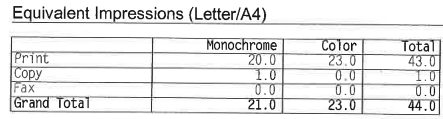
Meter Report Select your machine brand for instructions: HP Canon Other HP Machine – How to Find Meter Readings Tap Reports on the home screen Tap Configuration/Status page Select Usage Page Tap the Print icon On the printed report, find the Grand Total row: Take a photo of the page or enter the values in the form below Canon Machine – How to Find Meter Readings Tap the “123” button on the home screen (some machines have a physical button near the keypad) You’ll see the meter counts displayed on screen: Total, B+W, Color Enter these numbers into the form below or take a photo Other Machine Brands If you have a machine from another brand, please give us a call and we’ll walk you through finding the meter readings. Call us at: 770-218-2020 Or feel free to take a photo of your meter display and upload it in the form below. Meter Report Form Upload photos (optional, max 3) Δ